
If you are feeling the squeeze on ad budgets, you are not alone. Paid media keeps getting more expensive, competition is fiercer, and yet your audience still expects fresh, engaging content every week.
The good news? You do not need a studio, a full-time editor, or a massive team to create content that sells. What you need is a low cost content strategy that is intentional, repeatable, and focused on real business results.
In this blog, we will break down how “scrappy” content evolved from filler posts into a powerful growth engine, and how social media managers, business owners, and digital marketers can use low budget social media marketing to win more attention, inquiries, and sales.
Table of Contents
Why Low-Cost Content Suddenly Matters So Much
There was a time when brands felt they had to look like TV ads online. High production, complex shoots, big budgets. Today, the exact opposite is often true.
Short, phone-shot, quick-edit content usually performs better because:
- It feels native to social platforms
- It looks like the content people already consume from friends and creators
- It is fast to produce, so you can post more consistently
- It lets you test ideas without betting the entire budget on one video
For social media managers and digital marketers, this shift is a gift. You can design a high impact content on a budget plan that keeps your feeds active and still pushes people toward action.
Low-cost content is not about looking cheap. It is about creating content that sells without draining your resources.
Core Principles Of Low-Cost Content That Sells
Before you list a hundred low cost content ideas for social media, you need a simple foundation. Otherwise, you will post a lot and still feel like nothing is working.
1. Clarity Of Offer And Audience
If you cannot say who you serve and what you sell in one or two sentences, your content will confuse people.
Ask yourself:
- Who is my primary customer?
- What problem do they want solved?
- Why is my product or service a better option?
- What is the one action I want them to take after seeing my content?
Every piece of content should support that positioning. That is how you build a content strategy for small businesses that actually moves the needle.
2. Authenticity Over Perfection
Audiences are allergic to “too perfect.” They scroll past stiff, overly polished content because it feels like an ad. They stop for content that feels like a real person talking to them.
Low cost content works when you:
- Use real people, not just models
- Show behind-the-scenes moments
- Share honest stories and lessons
- Let some imperfections stay
You can still follow your brand guidelines, but let your posts breathe and sound human.
3. Consistency And Repetition
One of the biggest mistakes small brands make is chasing variety instead of consistency. They post something about everything and rarely repeat key messages.
The reality: people have short memories. They might need to see your offer in different angles and formats many times before acting.
A strong low cost content strategy repeats your main ideas in:
- Short vertical videos
- Carousels
- Text posts
- Stories
- Emails or blogs
Same message. Different wrappers. That is how you sell without sounding spammy.
4. Story, Not Just Features
Features are about you. Stories are about your customer.
Turn your features into stories by showing:
- The “before” scenario (pain, frustration, wasted time or money)
- The moment they find you
- The “after” (simpler, calmer, better results)
Even a simple video or carousel can follow this pattern: problem, relatable moment, solution, proof, call to action.
Low-Cost Content Types That Drive Sales
Now let’s get practical. Here are content types that are cheap to produce yet powerful for selling.
1. Short Vertical Videos (Reels, TikTok, Shorts)
All you need is a smartphone and basic editing.
Ideas you can shoot in a day:
- Quick product demos
- “Three tips” related to your niche
- Before and after transformations
- “Day in the life” of your business or team
- Customer reactions and first impressions
Use simple tools like CapCut, VN, or native editing apps. Focus on the hook in the first three seconds and end with a clear next step.
You can link this section to an internal guide like “How To Script A 30 Second Sales Video” for extra value.
2. Screenshot, Text, And Carousel Posts
You do not need fancy photos every time.
Use:
- Screenshots of real messages or reviews (with permission)
- Text-only posts with a strong opening line and clean background
- Carousels that walk through a mini tutorial, checklist, or mistake list
Carousels are perfect when you want content that sells by educating. People save and share them, which signals quality to the algorithm.
If you have a blog or FAQ page, each post can become a carousel summary that links back to that page.
3. User Generated Content And Creator-Lite Collaborations
UGC and small creators are a goldmine for low budget social media marketing.
You can:
- Ask customers to tag you when they use your product
- Run a simple giveaway where they share a photo or short clip
- Partner with nano or micro creators who align with your brand and let them create content in their own style
UGC does two things: it gives you extra content to post, and it acts as proof that real people love what you offer.
You can support this with an internal link like “How To Start With UGC Even On A Small Budget”.
4. Educational Edits: Tutorials, Explainers, FAQs
Educational content is one of the best ways to build authority while still keeping costs down.
Simple ideas:
- Screen recordings that show how to place an order
- Short clips answering “Is this for me if…?” type questions
- “How to get the most out of your purchase” tutorials
- FAQ carousels that handle objections before sales calls
When you share helpful information freely, you become the obvious choice when people are ready to buy.
5. Community And Engagement Content
Low-cost content is not only about pushing offers. You also need posts that keep your community talking.
Try:
- Polls and sliders in Stories
- “This or that” comparison posts
- Relatable memes tied to your product or niche
- Questions like “What is your biggest struggle with…?”
This type of content keeps your page alive and gives you insights into what your audience actually thinks and wants.
Turning Ideas Into A Real Low-Cost Content Strategy
Ideas are nothing without a system. Here is how to build a simple, scalable approach.
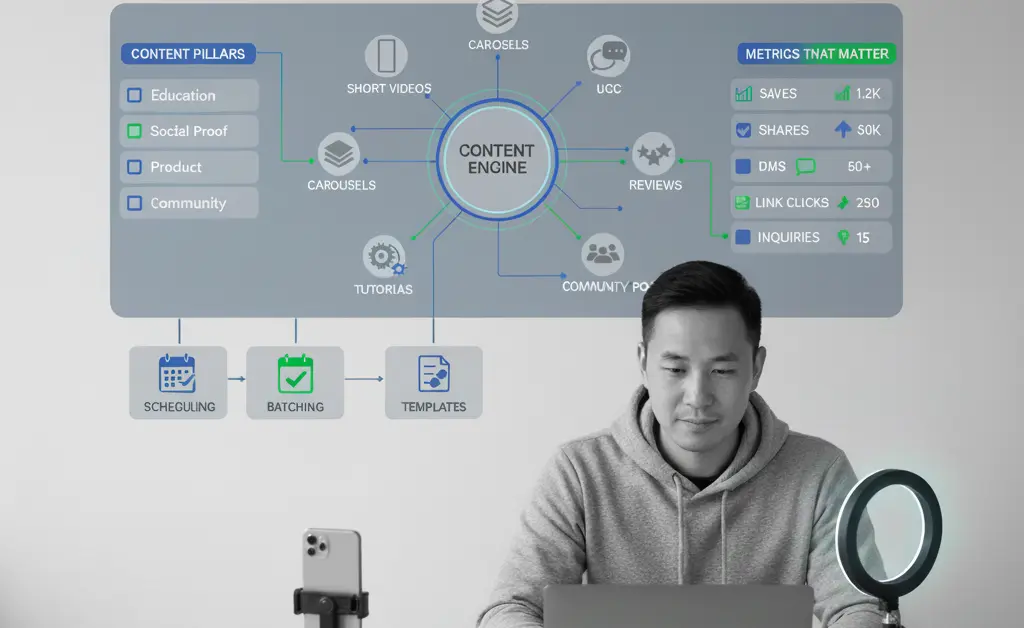
Step 1: Define Your Content Pillars
Pick three to five pillars that support your brand and sales goals. For example:
- Education (tips, myths vs facts, tutorials)
- Social proof (reviews, UGC, mini case studies)
- Product (benefits, features, demos, promotions)
- Lifestyle or context (where and how your product fits in daily life)
- Community (behind the scenes, team stories, values)
When you sit down to plan, you are not staring at a blank page. You are just filling each pillar with fresh angles.
Step 2: Plan And Batch
Instead of creating content day by day, work in batches.
You can:
- Brainstorm ideas for the month in one sitting
- Script short videos for two or three hours
- Film everything in one or two sessions
- Edit and schedule posts in another block
This approach saves time and mental energy. It also keeps your low cost content strategy consistent even when things get busy.
Consider linking to a downloadable content calendar template as an internal resource.
Step 3: Practice Social SEO And Strong Captions
Social platforms now operate more like search engines. That means your words matter.
Basic social SEO habits:
- Use your main topic or niche in the first lines of your captions
- Mix in location names and specific problems your audience has
- Use hashtags that are relevant and niche, not just generic
- Make your bio clear: who you help, what you offer, and where
For captions, simple frameworks work best. Hook, value, proof, call to action. You can create templates for your team so nobody has to start from zero.
Step 4: Build Simple Low-Cost Workflows
Document a light process, such as:
- Idea and pillar
- Format and platform
- Script or draft
- Design or edit
- Review
- Schedule
- Track performance
Store your templates in tools like Canva, Notion, or Google Drive. Over time, you will have a library of reusable pieces that keeps production fast and affordable.
Tools That Help Without Blowing The Budget
You do not need expensive software to win with a low cost content strategy. Start with accessible tools:
- Canva for design templates and quick graphics
- CapCut or VN for editing short videos on mobile
- Meta Business Suite, TikTok and Instagram schedulers for posting and basic analytics
- Notion, Trello, or a simple spreadsheet for content calendars and task tracking
Later, if you want to deepen reporting, you can set up simple dashboards with Google Analytics or Looker Studio to see how social traffic behaves on your website.
You can enhance authority by linking to external resources like Canva’s Design School, Meta Business Help Center, or TikTok Business Tips.